

Artificial intelligence is moving beyond simple question-and-answer chatbots. Modern AI systems can connect with tools, process information, make decisions, and complete multiple steps toward a specific goal.
This is where AI agents come into the picture.
Instead of simply giving you an answer, an AI agent can be designed to work through a process. It can analyze a problem, create a plan, use available tools, perform actions, review the result, and continue working until a defined objective is reached.
However, not every task needs an AI agent. In many situations, a normal AI chatbot can be faster, simpler, and easier to control.
Understanding the difference between a chatbot and an AI agent is the first step toward using AI agents effectively.
What Is an AI Agent?
An AI chatbot generally responds to instructions provided by a person. You ask a question, provide information, and receive a response.
An AI agent can go a step further. It is an AI-based system designed to work toward a specific objective by determining which steps may be necessary and, when connected to appropriate tools, carrying out authorized actions.
For example, a chatbot could answer:
How should I organize my emails?
An email-management agent could potentially analyze messages, categorize them according to defined rules, identify messages that need attention, prepare draft replies, and generate a summary.
The exact capabilities depend on the software, permissions, integrations, model, and instructions provided to the agent.
A simple way to understand the difference is:
- Chatbot: Primarily provides conversation, information, and assistance.
- AI agent: Works toward a defined goal through a multi-step workflow and may use external tools to perform authorized actions.
In simple terms, a chatbot mainly responds, while an AI agent can be designed to work through a process.
How Do AI Agents Work?
The exact architecture varies between platforms, but many AI agent workflows contain several basic stages.
- Understand the goal: The system receives an objective or task.
- Analyze the situation: It reviews the available context and information.
- Plan the work: It determines which actions may be needed.
- Use tools: When permitted, it can interact with external tools or systems.
- Review the result: It evaluates whether the work meets the defined requirements.
- Continue or finish: The workflow either performs another step or produces the final result.
A simplified AI agent workflow looks like this:
Goal → Plan → Act → Review → Complete
The actual process can be much more complicated depending on the task, model, tools, and level of autonomy involved.
The Main Components of an AI Agent
A useful AI agent usually needs several components working together. Understanding these components can also help if you want to learn how to build an AI agent.
1. Goal
The agent needs to know what it is trying to accomplish.
A vague goal such as:
Manage my business.
is too broad.
A more useful objective might be:
Review incoming customer-support messages, identify messages requiring a response, and prepare draft replies according to the company’s support guidelines.
The second objective gives the agent a clearly defined area of responsibility.
2. Reasoning and Planning
An AI agent may need to determine which steps are necessary to achieve its objective.
For example, a research agent might need to:
- Understand the research question.
- Gather relevant information.
- Organize the findings.
- Identify important evidence.
- Produce a structured report.
The ability to break a broad objective into smaller tasks is an important part of many AI agent workflows.
3. Tools
An AI model by itself may not be able to interact with every external system. Tools can give an agent additional capabilities.
Depending on the platform, these may include:
- Search tools
- Databases
- Email systems
- Calendars
- Spreadsheets
- File storage
- APIs
- Code execution environments
- Business software
Tools should be connected carefully because an agent can only operate safely when its permissions match its responsibilities.
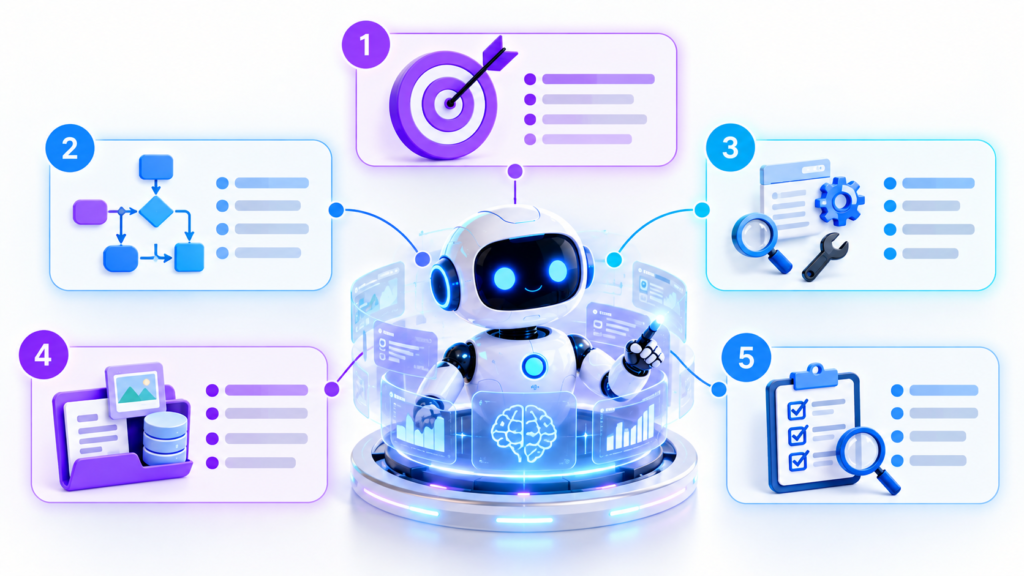
4. Context and Knowledge
Context provides the information an agent needs to make appropriate decisions.
For example, a customer-support agent might need access to:
- Product documentation
- Support policies
- Frequently asked questions
- Relevant customer information
- Previous conversations
- Escalation rules
Without sufficient context, even a capable AI system may produce incomplete or inappropriate results.
5. Evaluation
A reliable agent should have a way to check whether its work meets the defined requirements.
For example, after creating a report, an agent could check:
- Are all required sections present?
- Are calculations consistent?
- Was important information missing?
- Does the output follow the requested format?
This creates an important feedback loop:
Plan → Act → Review → Improve
This feedback process can make an agentic workflow more flexible than a simple one-step automation.
When Should You Build an AI Agent?
Not every task deserves an AI agent.
Building an agent can require time for designing instructions, connecting tools, testing behavior, managing permissions, and handling potential errors.
A useful starting point is to look for tasks that are repetitive, reasonably predictable, and valuable enough to automate.
Repetitive Tasks
Does the task happen regularly?
If you perform the same process every day or every week, automation may provide meaningful value.
Predictable Workflows
Does the task follow a consistent process or set of rules?
For example, a company may have specific rules for categorizing customer-support requests.
The more predictable the workflow, the easier it may be to define and test an automated process.
Valuable Tasks
Consider the time required to build and maintain the agent.
If a task takes two minutes once a month, creating a complex system for it may not make sense.
But if a team spends several hours every week performing the same process, automation may provide more practical value.
The goal is not to automate everything. The goal is to automate the right things.
Start With the Desired Outcome
One of the most important principles when designing an AI agent is to begin with the result you want.
Many people immediately start writing detailed instructions about every individual step.
A better starting question is:
What should be true when the agent has finished?
For example, instead of starting with:
Read my emails, label them, move certain messages, write replies, and create a report.
You could define the broader objective as:
Reduce the amount of manual time required to process incoming business email while ensuring important messages are identified and response drafts are prepared.
This gives the system a destination before you define the detailed workflow.
Define a Clear Definition of Done
An AI agent needs a measurable way to understand whether a task is complete. This is often described as a Definition of Done.
For an email workflow, it could include requirements such as:
- Important messages have been identified.
- Messages are categorized according to predefined rules.
- Draft replies follow the approved communication style.
- Uncertain cases are flagged for human review.
- No message outside the agent’s authorized scope is changed.
The exact requirements will depend on the task.
A clear Definition of Done reduces ambiguity and makes testing easier because you have a specific standard against which the agent can be evaluated.
Use AI to Help Design the Agent
You do not necessarily need to design every instruction manually.
AI itself can help you create the initial structure of an agent.
For example, you could ask an AI system:
I want to create an agent that manages a specific workflow. Interview me about the objective, users, rules, tools, risks, inputs, outputs, and success criteria. After asking the necessary questions, create a complete agent specification.
This approach can help identify requirements you may have forgotten.
Instead of immediately asking AI to perform the final task, you first ask it to discover what information is required.
This interview-based approach can be especially useful when you are designing an unfamiliar workflow.
Give the Agent a Clear Identity
An AI agent becomes easier to manage when its role and boundaries are clearly defined.
Consider organizing its instructions into three categories.
Behavior Profile
This describes how the agent should behave.
- Professional
- Concise
- Neutral
- Helpful
- Transparent about uncertainty
- Does not invent information
Role Definition
This explains what the agent is responsible for.
Role: Customer Support Assistant
Responsibilities: Analyze incoming support requests, categorize them, and prepare draft responses based on approved documentation.
Restrictions: Do not issue refunds, change account information, or make decisions outside the defined support policy.
User or Organization Context
This describes the people or organization the agent is working for.
It might contain:
- Business goals
- Target customers
- Preferred communication style
- Relevant products
- Important terminology
- Operating procedures
Keeping these categories separate can make an AI agent’s instructions easier to understand and update.
Give the Agent the Right Context
More information is not always better.
An agent needs relevant information that helps it perform the task.
Providing hundreds of unrelated documents can make it harder for an AI system to identify which information actually matters.
A better approach is to organize information into useful categories:
- Core instructions: Rules the agent should always follow.
- Reference information: Documents it can consult when necessary.
- Examples: Previous examples showing what a successful output looks like.
- User information: Relevant preferences and background.
- Task data: Information related to the current assignment.
This organization can help keep the agent’s working context focused.
Avoid Context Overload
When an AI workflow contains too much irrelevant information, the system may have difficulty identifying the most important details.
This is sometimes discussed in terms of context overload or context degradation.
Instead of giving an agent everything you have, provide the information it actually needs.
A well-organized knowledge structure can be more useful than a huge collection of disconnected files.
Turn Your Existing Workflow Into Agent Instructions
Before building an AI agent, document how the task is currently performed.
There are two useful approaches.
Method 1: Record the Process
Perform the task normally while explaining what you are doing.
For example:
I first check the sender. Then I determine whether the message is urgent. If it is from an existing customer, I check the previous conversation. If I need additional information, I flag the message instead of responding.
That explanation or transcript can then be transformed into a structured procedure.
Method 2: Analyze Existing Examples
If you already have a collection of completed work, AI can sometimes analyze suitable examples to identify patterns.
For example, if you want to create an email-writing assistant, appropriate historical examples could help identify:
- Writing style
- Sentence structure
- Typical greetings
- Closing style
- Tone
- Common terminology
- Formatting preferences
However, sensitive information should be handled carefully. Private or confidential data should only be provided when the relevant privacy and security requirements are understood and satisfied.
Keep Each AI Agent’s Scope Small
One common mistake is trying to create one large AI system that handles everything.
A better approach is often specialization.
For example, instead of one agent responsible for an entire business, you might create separate workflows for:
- Research
- Customer support
- Data analysis
- Content creation
- Code review
- Reporting
Each specialized agent can have its own instructions, tools, permissions, and knowledge.
This can reduce complexity and make troubleshooting easier.
Use Multiple AI Agents When Necessary
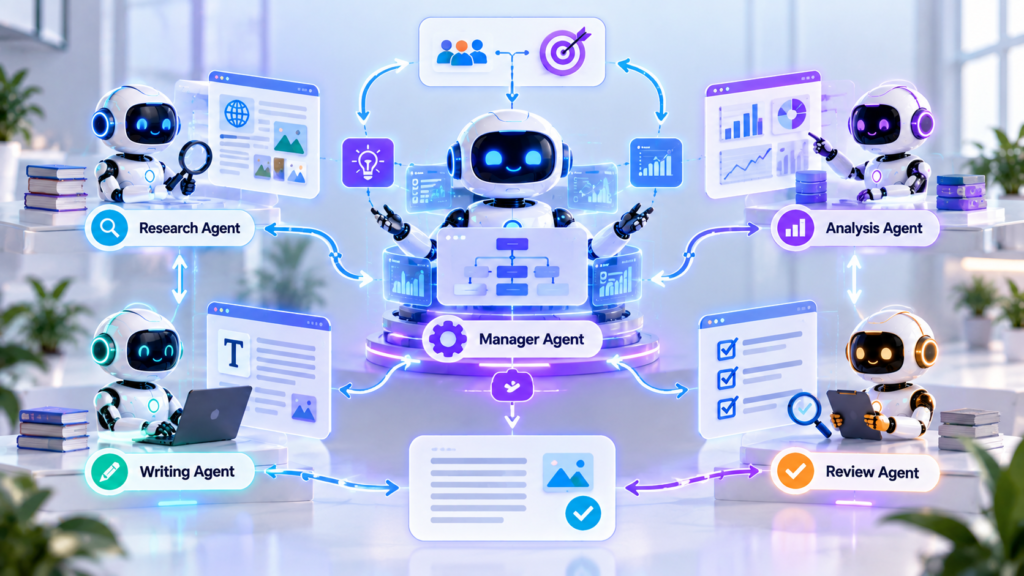
For complicated workflows, specialized agents can potentially work together.
A simple multi-agent architecture might look like this:
Manager Agent
Coordinates the overall process.
↓
Research Agent
Collects and organizes relevant information.
↓
Analysis Agent
Examines the information and identifies important findings.
↓
Writing Agent
Creates the requested document or output.
↓
Review Agent
Checks the result against predefined requirements.
The exact AI agent architecture depends on the workflow.
The important principle is that every component should have a clear responsibility.
Add Human Oversight
AI agents should not automatically receive unlimited access to important systems.
Human review can be especially valuable for actions involving:
- Money
- Legal decisions
- Sensitive personal information
- Account changes
- Irreversible actions
- External communications
- Security settings
A useful design principle is to give an agent enough permission to complete its task but no more authority than necessary.
For higher-risk actions, the system can prepare a recommendation or draft and require human approval before execution.
Choose AI Models According to the Task
Different AI models and platforms can have different strengths, costs, speeds, and capabilities.
You do not always need the most powerful model available.
A lightweight model may be suitable for simple classification or repetitive processing, while a stronger reasoning model may be more appropriate for complicated analysis, planning, or technical work.
When selecting a model, consider:
- Accuracy
- Speed
- Cost
- Context capacity
- Tool support
- Reliability
- Privacy requirements
- Complexity of the task
The appropriate choice depends on the specific workflow rather than simply selecting the most advanced model.

Test an AI Agent Before You Trust It
An AI agent should be tested before being given responsibility for important work.
Create different test cases, including:
- Normal situations
- Missing information
- Unexpected inputs
- Ambiguous requests
- Incorrect data
- Edge cases
- Potentially dangerous actions
Then measure whether the agent follows its instructions.
If it makes mistakes, investigate the underlying cause.
Ask questions such as:
- Was the goal unclear?
- Was the context incomplete?
- Was an important rule missing?
- Did the agent have too much authority?
- Was the model suitable for the task?
Testing helps turn an experimental AI workflow into a more reliable system.
A Simple AI Agent Development Workflow
If you are learning how to build an AI agent, you do not need to begin with a complicated system.
Start with a single workflow and follow these steps:
- Choose one repetitive task.
- Define the desired outcome.
- Document the current process.
- Identify the information the agent needs.
- Select the tools it requires.
- Define permissions and restrictions.
- Create a clear Definition of Done.
- Test normal and unusual situations.
- Add human approval where appropriate.
- Improve the workflow based on test results.
AI Agents vs. Chatbots: What’s the Difference?
| Feature | AI Chatbot | AI Agent |
|---|---|---|
| Primary purpose | Answer questions and assist users | Work toward a defined objective |
| Interaction | Usually conversation-based | Can involve multi-step workflows |
| Tools | May have limited tool access | Can be connected to multiple tools |
| Planning | Often responds directly | May plan and execute multiple steps |
| Actions | Primarily generates responses | May perform authorized actions |
| Best suited for | Questions, brainstorming, drafting, and assistance | Repeatable workflows, automation, and multi-step tasks |
The distinction is not always absolute because modern AI products can combine chatbot and agent-like capabilities. The important question is what the system is designed and authorized to do.
Frequently Asked Questions About AI Agents
What is an AI agent?
An AI agent is an AI-based system designed to work toward a specific objective. Depending on its design, it can interpret information, plan steps, use tools, perform authorized actions, and evaluate results.
How do AI agents work?
AI agents generally receive a goal, process relevant context, determine possible actions, use available tools, and evaluate their results. More complex systems may repeat this process across multiple steps until the defined objective is reached or human intervention is required.
How can I build an AI agent?
Start by choosing one specific workflow. Define the goal, required inputs, tools, permissions, expected output, and Definition of Done. Then configure the AI system, test it with normal and unusual cases, and improve the workflow based on the results.
What are AI agents used for?
AI agents can be used for workflows such as research, customer support, data processing, reporting, content operations, scheduling, and other tasks that involve multiple steps and appropriate tool access.
Do AI agents replace chatbots?
No. Chatbots and AI agents can serve different purposes. A chatbot may be more appropriate for answering questions or helping with a simple task, while an AI agent may be useful when a workflow requires multiple steps, tool use, and goal-oriented actions.
Are AI agents always fully autonomous?
No. An AI agent can be designed with different levels of autonomy. Some agents may only recommend actions, while others may perform authorized tasks automatically. Human approval can be required for higher-risk actions.
Are AI agents safe to use?
The safety of an AI agent depends on its design, permissions, tools, data, testing, and human oversight. Agents should receive only the access they need, and higher-risk actions should have appropriate safeguards.
Do I need programming skills to use AI agents?
Not necessarily. Some AI platforms provide visual or low-code tools for creating agent workflows. More advanced systems may require programming, APIs, databases, authentication, testing, and other technical skills.
Final Thoughts
AI agents represent a shift from simply asking AI questions to designing systems that can work toward defined objectives.
The most important part is not the technology itself. It is the workflow behind it.
Start with a clear outcome. Define what success means. Give the agent a specific role, relevant context, appropriate tools, and a limited scope. Then test its performance and keep human oversight where the consequences of mistakes are significant.
You do not need to build a complicated multi-agent system immediately.
Start with one repetitive task. Document the process, identify the desired outcome, create clear instructions, test the system, and improve it over time.
A well-designed AI agent should not simply make your workflow more complicated. Its purpose should be to remove unnecessary manual work while maintaining the appropriate level of human control.
The future of AI is not only about better chatbots. It is also about building practical systems that can process information, use tools, and help people accomplish meaningful goals more efficiently.
The best place to start is simple: choose one real workflow, define the outcome, test a small AI agent, and improve it step by step.